Uninstallation
If you are no longer using Elecom WebCam+, please follow the steps below to uninstall it.
- Please log in with a user account that has administrative privileges before installing the software.
- Click Start
 , and then click settings
  .
.
Settings screen will appear.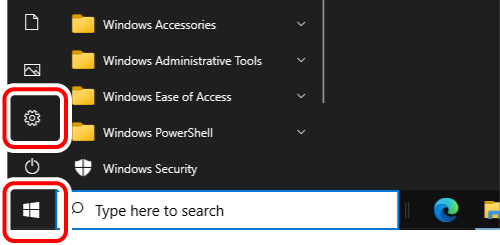
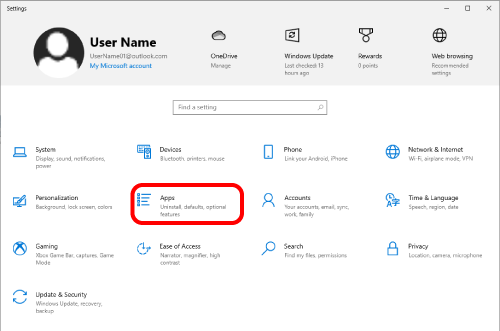
- Click [Apps].
- Select “ELECOM WebCam Assistant Plus” on Apps & features, and then click [Uninstall].
Uninstallation will begin.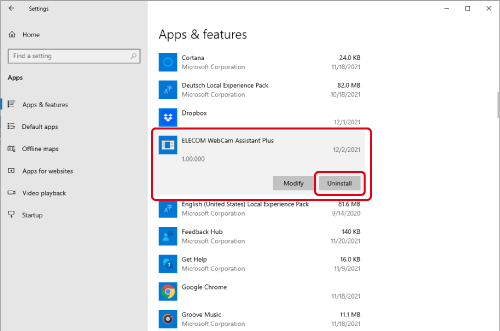
- The uninstaller will launch. Follow the on-screen instructions to proceed with the uninstallation.
- When the "User Account Control" screen is displayed, click the [Yes] button.
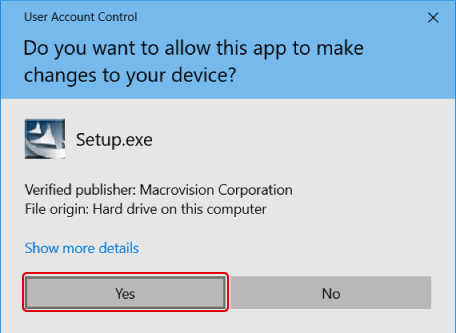
- When the "User Account Control" screen is displayed, click the [Yes] button.
- >Click [Yes].
Uninstallation will begin.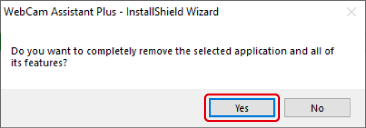
- When the uninstallation is complete, click [Finish].
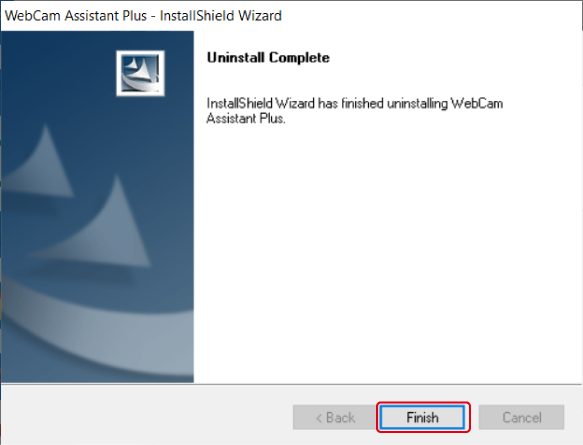
This completes the installation.
- If you uninstall ELECOM WebCam Assistant Plus, both WebCam+ and WebCam Assistant+ will be uninstalled at the same time.