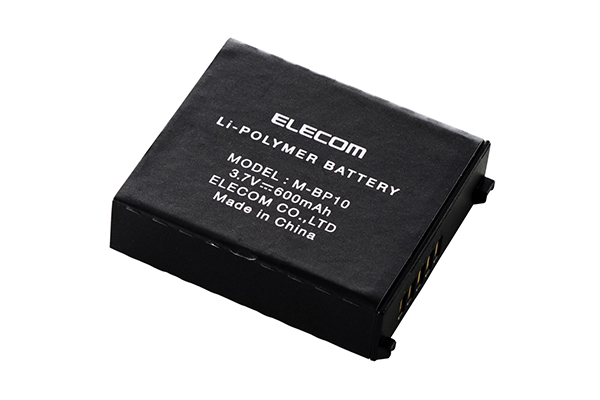
Compliant model: M-BP10
This manual describes the important precautions you should take for safe operation of this product.
Observe these precautions carefully to avoid personal injury, damage, fire, and other problems.
Meaning of symbols
DANGER
Failure to adhere to the precautions listed here carries the high risk of severe injury or death due to fire, electric shock, or other causes.
WARNING
Failure to observe precautions carries the possibility of serious personal injury or death due to fire, electric shock, or other causes.
CAUTION
Failure to observe precautions may result in personal injury due to electric shock or other causes, and may damage other equipment.
Prohibited action
Mandatory action
Situation that needs attention
Notes and reference information
Please use the charging cable included with the IST PRO series product and observe our specified charging conditions.
Usage of other charging cables or failure to observe our charging conditions may cause the battery to overheat, leak, or rupture.
Do not attempt to disassemble, modify, or repair this product.
Doing so may cause a fire, electric shock, or product damage.
Such malfunctions are not covered under warranty.
Do not use if there is any leaking.
Do not use if liquid seeps out from this product. This may lead to overheating and rupturing.
If you notice any abnormalities with this product, stop using immediately.
If you notice any leaking, discoloration, deformation, or any other abnormalities from past usage, stop using immediately. Continued use may lead to overheating and rupturing.
If you or your clothes come into contact with any liquid from this product, wash with clean water.
If the liquid from the inside this product comes into contact with the skin, it can lead to skin damage.
The liquid from inside this product can cause blindness if it enters the eye. If this happens, do not rub your eye. Wash thoroughly with clean water and seek immediate medical attention.
Please use at the prescribed voltage.
Usage outside the prescribed voltage range can cause overheating, ignition, electric shock, or personal injury.
Please do not remove the battery pack using sharp items such as a screwdriver.
A damaged battery pack can cause fire, electric shock, or malfunction.
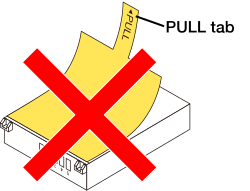
Please do not remove the PULL tab from the battery pack as shown in the illustration below.
Peeling off the protective material on the surface can cause damage, fire, electric shock, or malfunction.
If a foreign object (water, metal chips) enters the IST PRO series product, stop using immediately and remove this product.
Continuing to use the product as it is may cause a fire or an electric shock.
Please do not drop or hit this product.
In the event that this product is damaged, cease usage immediately and contact your dealer.
Fires or electric shocks may occur if this product is used when damaged.
Do not put this product in fire.
Breakage may cause fire or injury.
Do not touch this product with wet hands.
It can cause a fire or electric shock.
Do not place this product in any of the following environments:
This product does not have a waterproof structure. Use or store in a place not exposed to liquids such as water.
Any liquid such as rain, water spray, juice, coffee, steam, and sweat, can cause this product to breakdown.
The following instructions are for the IST PRO.
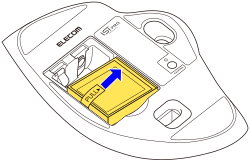
1) Remove the battery cover.
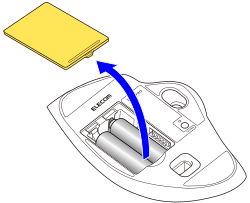
2) Remove the batteries.
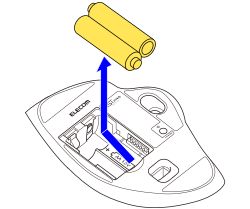
3) Align the terminals on the battery pack with the terminals in the battery storage compartment of the IST PRO to insert.
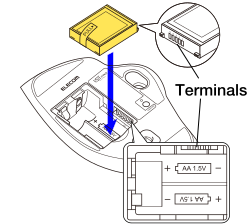
Check that the battery is correctly orientated.
4) Put the battery cover back on.
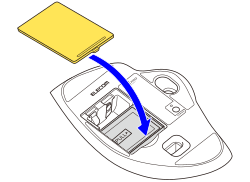
When inserting the battery pack, check that the PULL tab is not caught underneath.


